
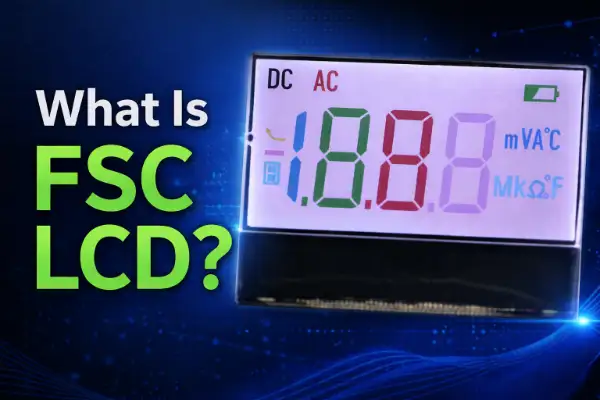
1. Introduction: Why Color Segment LCD Is Becoming Important
In the past few years, I have noticed a very clear change in customer requirements.
Customers are no longer satisfied with “just a display”.
They want:
- Better UI appearance
- Clear visual hierarchy
- Product differentiation in the market
Especially in B2B industries like:
- Automotive
- Industrial control
- HVAC systems
- Smart home panels
The display is no longer just a component.
It becomes part of the product design.


If you are looking for a supplier of custom LCDs, please feel free to Contact Us at any time.
1.1 The Problem with Traditional Segment LCD
Let me be honest.
Traditional segment LCD is still very reliable.
It has:
- Very low cost
- Very low power consumption
- Long lifetime
But it also has limitations.
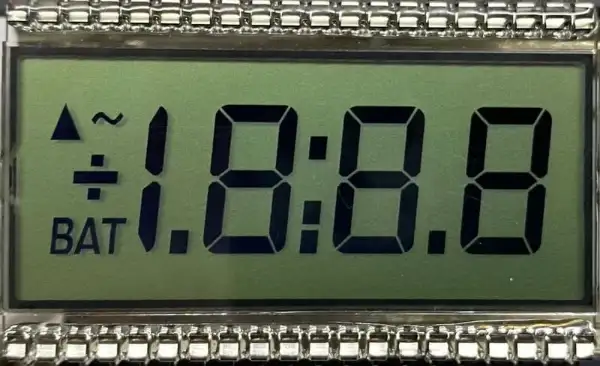
Limitation 1: Single Color Only
Most segment LCDs use:
- White backlight
- Blue
- Amber
Only one color at a time.
This makes the UI look outdated.
Limitation 2: Poor Visual Differentiation
All segments look the same.
For example:
- Warning icon
- Temperature
- Status indicator
All displayed in the same color.
This is not user-friendly.
Limitation 3: Weak Product Design Appeal
From a product perspective:
- It looks “cheap”
- Hard to compete with modern interfaces
If you want to know more about Traditional Segment LCD, please check more Segment LCD.
1.2 Why Not Use TFT?
Many customers ask me this.
“Why not just use TFT?”
Yes, TFT can solve everything.
But it also brings problems.
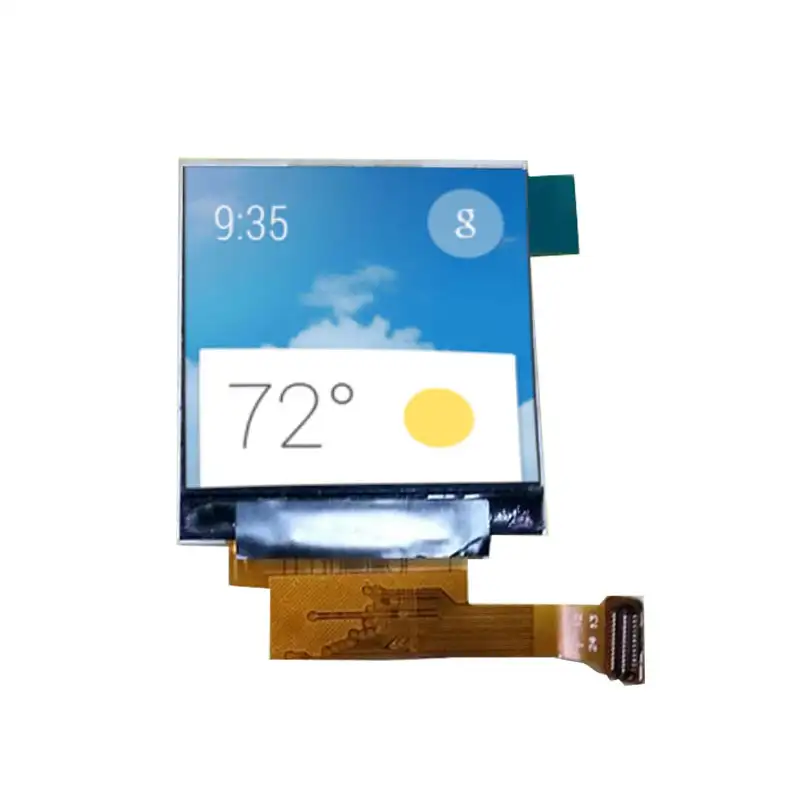
Higher Cost
TFT cost is much higher than segment LCD.
Especially for:
- Simple UI products
- Large volume production
Higher Power Consumption
For battery-powered devices:
This is critical.
Over-Engineering
In many projects:
You only need:
- Numbers
- Icons
Not full graphics.
Using TFT is unnecessary.
If you want to know more about TFT LCD, please check out more TFT LCD.
1.3 FSC LCD: The Balance Between Cost and Design
This is exactly why FSC LCD becomes important.
In my view, FSC LCD is a balanced solution.
It keeps:
- Low power
- Simple structure
- Long lifetime
And adds:
- Multi-color display
- Better UI
- Higher product value
Typical FSC LCD Visual Effect
From these examples, we can clearly see:
- Different colors used for different functions
- Strong visual hierarchy
- Modern product feeling
This is exactly what engineers want today.
2. What Is FSC LCD?
Now I will explain FSC LCD in a more technical and practical way.
2.1 Simple Definition
FSC LCD is:
A segment LCD combined with RGB backlight
Used to achieve multi-color display on segmented content
It is NOT:
- A full-color TFT
- Not pixel-based display
It is still:
- Segment-based
- Low power
- Highly stable
2.2 Why FSC LCD Is Different
The key difference is:
Color is no longer fixed
In traditional LCD:
- One backlight → one color
In FSC LCD:
- RGB backlight → multiple colors
And more importantly:
Colors can be dynamically controlled
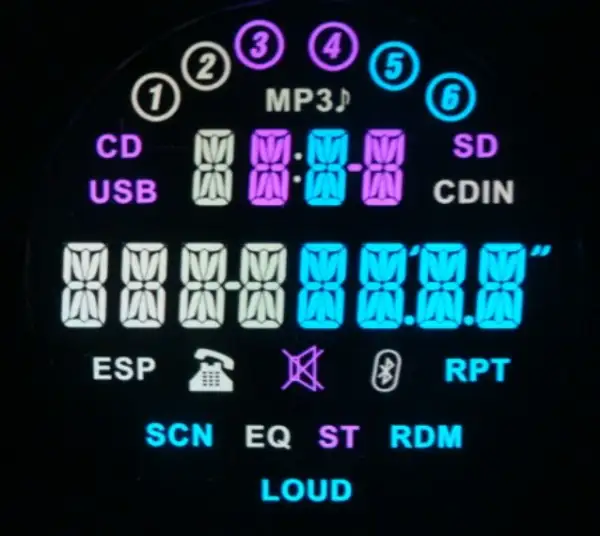
Above LCD panel with RGB backlight, the segments can be changed colors
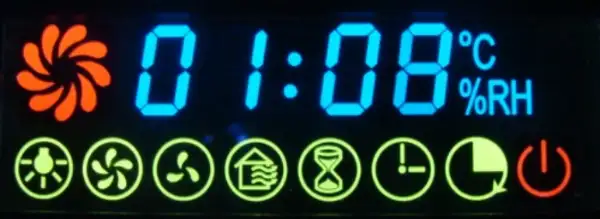
Above LCD panel is with white backlight, with color sick screen.
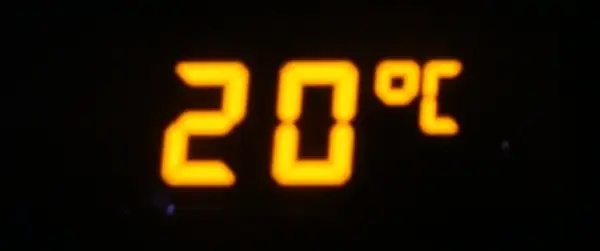
Above LCD panel is with Amber color backlight
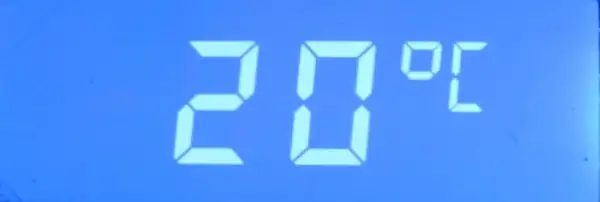
Above LCD panel is HTN, negative(blue color), with white backlight.
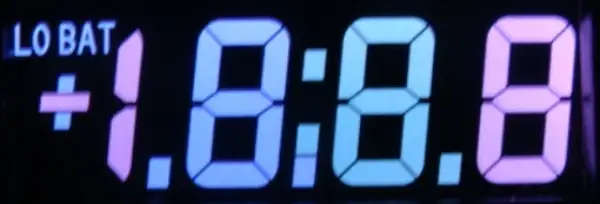
Above LCD panel is with RGB backlight, the segments can be changed colors
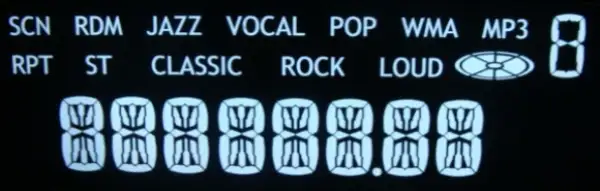
Above LCD panel is with white backlight, this is for Car Radio.
2.3 Internal Structure (Engineering Perspective)
Let me break this down step by step.
1. LCD Glass Layer
This is the base.
We can choose:
- TN LCD → lowest cost
- HTN LCD → better contrast
- VA LCD → best contrast (recommended for premium design)
In most of our FSC projects:
VA LCD is the first choice
Because:
- Dark background
- Bright segments
- Very strong visual effect
2. Segment Layout Design
This is fully customized.
We design:
- Numbers (7-segment / 14-segment)
- Icons
- Symbols
Each segment is:
Independently controlled
This is very important.
Because it allows flexible UI design.
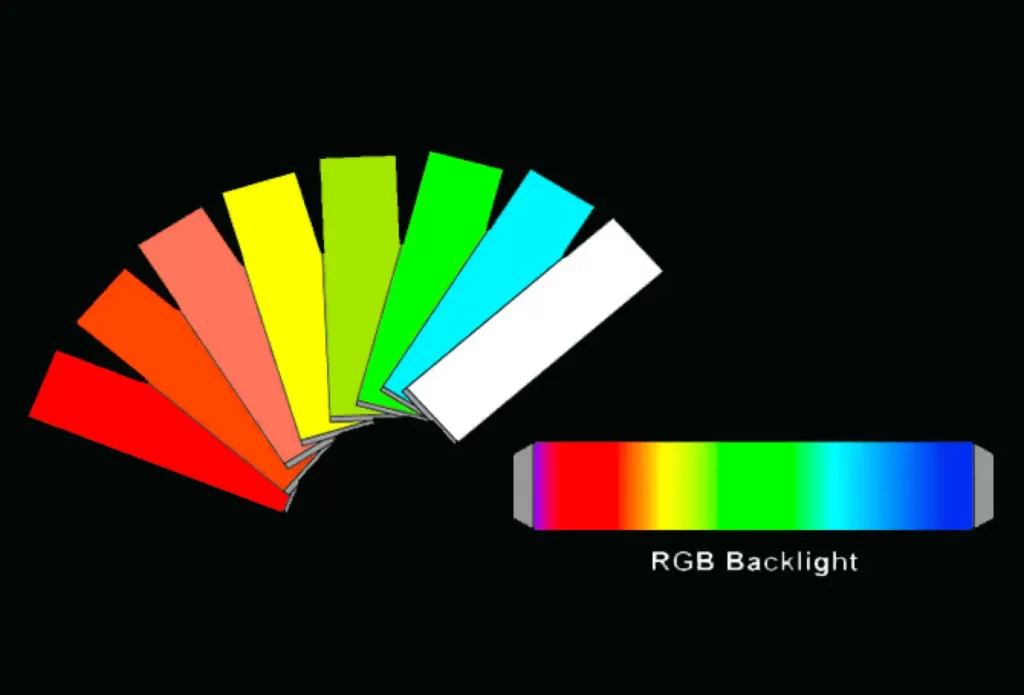
3. RGB Backlight System (Core Technology)
This is where FSC becomes powerful.
We use:
- Red LED
- Green LED
- Blue LED
These LEDs can be:
- Controlled independently
- Or mixed together
2.4 How Color Is Generated (Deep Explanation)
Many customers misunderstand this.
They think:
“LCD itself generates color”
This is incorrect.
LCD is only a light valve
It controls light passing through.
Step-by-Step Process:
Step 1: Backlight Emits Color
RGB LEDs generate light.
For example:
- Red ON → red light
- Green ON → green light
- Blue ON → blue light
Step 2: LCD Segment Controls Light
Each segment decides:
- ON → light passes
- OFF → light blocked
Step 3: Final Color Output
Combine both:
RGB light + segment ON = colored segment
Example:
- Warning icon → red
- Temperature → white
- Status → green
All on the same display.
This is impossible with traditional LCD.
Real Product Examples from Our Document
From your document :contentReference[oaicite:2]{index=2}, we already see:
- White backlight → car radio
- Amber → classic automotive
- Blue negative HTN → modern UI
Now imagine combining them.
FSC LCD can integrate all styles into one module
This gives designers much more freedom.
2.5 FSC LCD vs Traditional Segment LCD (Detailed Comparison)
| Feature | Traditional LCD | FSC LCD |
|---|---|---|
| Color | Single | Multi-color |
| UI Flexibility | Low | High |
| Cost | Lowest | Medium |
| Power Consumption | Very low | Low |
| Customization | Limited | High |
2.6 When Should You Use FSC LCD?
From my experience, FSC LCD is ideal when:
✔ You need product differentiation
✔ You want better UI without TFT cost
✔ You need low power consumption
✔ You want long lifetime supply (3–10 years)
3. How FSC LCD Works
When I talk with customers, I often find one misunderstanding.
Many people think FSC LCD is a special kind of color LCD glass.
Actually, that is usually not the best way to understand it.
In most projects, the LCD glass itself is still a segmented monochrome structure.
What changes the visual effect is the combination of:
- the segment pattern on the glass,
- the optical mode of the LCD,
- the color filter or printed color area if used,
- and most importantly, the RGB backlight design. :contentReference[oaicite:0]{index=0}
So when I explain FSC LCD, I prefer to describe it like this:
FSC LCD is a segmented LCD solution that creates richer color presentation through optical design and backlight control, while still keeping the low-power and simple-drive advantages of segment LCD.
This definition is closer to how customers should evaluate the technology.
3.1 First, What Does the LCD Glass Actually Do?
The LCD glass is not a light source.
It does not “emit” red, green, or blue.
Its real job is much simpler:
- it controls whether light passes through,
- how much light passes through,
- and in what visual form the segment appears.
So when one segment becomes visible, what we really see is:
- backlight light is on,
- the LCD segment state allows that light to be seen,
- and the optical stack makes the final appearance look clear and attractive.
This point is very important.
Because if a customer believes the glass itself is doing all the color work, the project discussion can go in the wrong direction very quickly.
3.2 The Basic Structure of an FSC LCD Module
When I review this kind of project, I normally divide the module into several functional layers.
1. Front polarizer
This affects:
- visual style,
- contrast,
- outdoor readability,
- and the final appearance of the front surface.
2. LCD glass with segment pattern
This is where the display content is defined.
For example:
- digits,
- icons,
- bars,
- status symbols,
- warning marks,
- battery shapes,
- fan speed levels,
- temperature symbols,
- and many other custom elements.
3. Rear polarizer / optical design layer
This works with the LCD mode to determine:
- positive or negative appearance,
- contrast level,
- black background effect,
- and viewing quality.
4. Backlight unit
This is one of the core points in FSC LCD.
It can be designed with:
- white backlight,
- amber backlight,
- or RGB backlight.
Your document shows several practical directions clearly:
- RGB backlight for changeable segment colors,
- white backlight for a cleaner standard look,
- amber backlight for classic automotive style,
- and blue negative style for HTN-based appearance. :contentReference[oaicite:1]{index=1}
5. PCB and driving circuit
This controls:
- segment signals,
- backlight LEDs,
- brightness,
- and in some cases the timing of color switching.
6. Mechanical frame or full module structure
If the product is supplied as a module, this layer also includes:
- connector solution,
- housing support,
- light guide positioning,
- and assembly tolerance control.
This is why I often tell customers that FSC LCD is not just a “glass discussion”.
It is a system-level display design discussion.
3.3 Segment LCD Driving Principle: The Foundation Still Matters
Even if we add RGB backlight, the display is still based on normal segment LCD logic.
That means every visible element must first be defined as a segment.
For example, if you want to show:
- a power icon,
- a Bluetooth symbol,
- a warning triangle,
- a temperature number,
- a ℃ sign,
- and three fan levels,
all of these must be created in the glass layout stage.
Nothing can be “drawn freely” the way a TFT can.
This is the first design boundary.
What this means for customers
When I support a custom project, I usually ask for:
- display content draft,
- icon list,
- numeric format,
- symbol requirements,
- and if possible a UI sketch.
Because the segment design is fixed.
Once the glass is made, the display content cannot behave like a pixel screen.
So FSC LCD has clear advantages, but it also requires disciplined design thinking.
3.4 Why FSC LCD Looks More Advanced Than Standard Segment LCD
Now let me explain the real reason.
A standard segment LCD usually gives the user a very simple visual hierarchy.
For example:
- all digits are white,
- all icons are amber,
- or the entire interface is blue negative.
It works.
But everything carries the same visual weight.
That means:
- warning information does not stand out enough,
- status information is not separated clearly,
- and the interface can feel flat.
FSC LCD improves this by introducing color hierarchy.
For example:
- green can mean normal operation,
- amber can mean standby or setup,
- red can mean warning,
- white can be used for the main reading value.
Even if the display is still a segment LCD, the user experience becomes much more intuitive.
This is why many customers from automotive, smart control, and appliance industries are interested in this direction.
3.5 RGB Backlight: What It Really Does
Let me explain this very carefully.
When we say “RGB backlight”, it does not automatically mean every segment can independently become any color.
That is one of the most common misunderstandings.
What RGB backlight really gives us is the ability to control the light source color behind the display.
This can be done in different levels of complexity.
Level 1: One global RGB backlight area
This is the simplest design.
The whole display area uses one RGB backlight system.
So the complete display can switch between:
- red,
- green,
- blue,
- white,
- amber-like mixed tones,
- or other mixed colors.
This design is useful when the customer wants:
- several product modes,
- a modern appearance,
- but not true multi-zone functional color separation.
For example:
- standby mode = blue,
- active mode = white,
- alarm mode = red.
This is already more attractive than a fixed single-color module.
Level 2: Multiple backlight zones
This is where the project becomes more valuable.
The backlight is divided into separate areas.
Each area can be controlled independently.
For example:
- left side icons = green zone,
- middle digits = white zone,
- right side warning icon = red zone.
This approach gives much stronger UI logic.
But it also increases the design difficulty.
Because now we must control:
- zone separation,
- light leakage,
- uniformity,
- PCB LED arrangement,
- and synchronization between segment content and light area.
This is usually the level customers imagine when they first see a strong FSC effect.
Level 3: More advanced optical combination
In some projects, customers also use:
- printed color effects,
- colored silk,
- special mask design,
- or optimized light guide structures.
These methods help refine the final appearance.
But they also require more engineering coordination.
So when I discuss FSC LCD with a customer, I never jump straight to “yes, every segment can be any color”.
I first define the architecture.
Because the final effect depends on how the backlight is zoned and how the optics are designed.
3.6 The Real Engineering Challenge: Segment Layout Must Match Light Layout
This is one of the most important points in the whole project.
Even if your backlight is excellent, the result can still fail if the segment distribution and the light distribution do not match.
Let me give a simple example.
Assume a customer wants:
- a red warning icon,
- a green running icon,
- and white temperature digits.
If all three are physically mixed too closely in one small area, it becomes difficult to separate the colors cleanly.
Problems can appear such as:
- red bleeding into nearby white digits,
- green contaminating adjacent icons,
- uneven color edges,
- or a visually messy interface.
So during layout evaluation, I pay attention to:
- how far apart the key segments are,
- whether light barriers are possible,
- whether separate light guide regions are feasible,
- and whether the visual goal matches manufacturing reality.
This is why I often say:
good FSC LCD effect starts from good segment architecture, not only from LED selection.
3.7 Why VA LCD Is Often a Good Base for FSC Design
Your file shows both FSC and VA related directions together, and that makes sense.
In many premium projects, I prefer to discuss VA first.
Why?
Because VA LCD usually provides:
- dark background,
- stronger contrast,
- cleaner modern appearance,
- and better “hidden until lit” style in some designs.
When we combine that kind of visual base with RGB backlight, the result usually looks much more premium than a basic standard segment module.
For customers in:
- automotive interiors,
- control panels,
- premium appliances,
- and branded consumer devices,
this visual upgrade matters a lot.
It can make the product look more intentional and more valuable without moving all the way to TFT.
3.8 White, Amber, Blue Negative, and RGB: Why Customers Choose Different Styles
Your document is useful because it does not show only one style.
It shows several display directions that real customers often ask for. :contentReference[oaicite:3]{index=3}
Let me explain the logic behind them.
White backlight
Customers choose this when they want:
- neutral appearance,
- clean readability,
- modern but safe styling.
This is common in:
- home appliances,
- general industrial equipment,
- car radio style interfaces.
Amber backlight
Customers choose this when they want:
- classic automotive feeling,
- soft night readability,
- warm visual tone.
Amber is still popular in certain vehicle and instrument applications.
Blue negative or similar style
Customers choose this when they want:
- stronger contrast impression,
- more technical appearance,
- a modern electronic feel.
RGB backlight
Customers choose this when they want:
- product differentiation,
- mode indication,
- visual hierarchy,
- and stronger brand identity.
So the decision is not only about color preference.
It is about:
- user interface logic,
- brand expression,
- and application environment.
3.9 Control Logic: Segment Drive and Backlight Drive Are Two Related Systems
From a system point of view, I usually explain FSC LCD as two control layers.
Layer A: Segment control
This determines what content is visible.
Examples:
- digit 8 appears,
- battery icon turns on,
- fan symbol turns off.
Layer B: Backlight control
This determines what color or brightness the visible content appears in.
Examples:
- white for normal mode,
- blue for standby,
- red for warning,
- green for success or active state.
These two layers must work together.
If they are poorly coordinated, the display can become confusing.
For example:
- the warning icon is on, but the whole display remains white,
- or the red alert color appears in a zone where the icon is not active,
- or brightness changes make some segments look inconsistent.
This is why software, hardware, and optical design should be discussed together early.
3.10 Common Mistakes I See in FSC LCD Projects
I want to make this section practical.
Because many customer projects do not fail because the idea is wrong.
They fail because the first concept is not detailed enough.
Mistake 1: Thinking RGB automatically means unlimited color freedom
It does not.
We must first confirm:
- number of zones,
- light guide design,
- space limitation,
- and cost target.
Mistake 2: Segment content is too dense
If too many icons and digits are packed together, color separation becomes more difficult.
Mistake 3: No early discussion about viewing environment
A display used in a car, factory machine, or indoor thermostat does not need the same optical solution.
Mistake 4: Focusing only on the glass drawing
In FSC LCD, the final appearance is heavily influenced by:
- backlight architecture,
- reflector,
- diffuser,
- mask design,
- and mechanical fit.
Mistake 5: No clear priority between cost and effect
Some customers want:
- very rich color separation,
- very thin structure,
- very high brightness,
- and very low cost,
all at the same time.
In practice, we need to prioritize.
3.11 A Practical Example of Design Thinking
Let me show how I would think through a project.
Assume the customer is developing an HVAC control panel.
The display needs to show:
- room temperature,
- set temperature,
- fan speed,
- warning icon,
- mode icons.
Now I would not immediately discuss price.
I would first ask:
- Which information is most important?
- Which information should stand out?
- Do you want one overall color change, or multiple functional colors?
- Is the display used mostly in daylight or indoor environment?
- Do you prefer premium appearance or lower cost?
If the customer says:
- warning must be very obvious,
- temperature must be neutral and clear,
- fan speed can be secondary,
- product is used indoors,
- and brand wants a modern look,
then a likely direction could be:
- VA negative structure,
- white main digits,
- red warning zone,
- green or blue secondary status zone.
That is how FSC LCD should be discussed.
Not only by saying “we want RGB”.
But by translating UI logic into manufacturable display logic.
3.12 Why FSC LCD Is Attractive for B2B Customers
From a B2B point of view, I think FSC LCD is attractive because it solves a very practical gap.
It sits between two extremes.
On one side:
- standard segment LCD is economical,
- but visually limited.
On the other side:
- TFT is powerful,
- but often unnecessary for simple icon-and-digit interfaces.
FSC LCD gives many customers a middle solution:
- more attractive than standard segment LCD,
- simpler and lower power than TFT,
- and still suitable for custom industrial-style products.
That is why I think it has strong value in markets like:
- industrial control,
- automotive accessories,
- home appliances,
- HVAC,
- smart devices,
- and premium instrument panels.
4. FSC LCD vs Standard Segment LCD vs VA LCD: A More Careful Comparison
In many customer conversations, these three options come up together.
So I want to compare them more carefully.
4.1 Standard Segment LCD
This is the most traditional solution.
Strengths
- low cost,
- mature supply chain,
- low power,
- simple implementation.
Limitations
- usually one visual tone,
- limited interface differentiation,
- weaker premium feeling.
This is still a very good choice if the product only needs:
- numbers,
- simple icons,
- and strict cost control.
4.2 VA LCD
VA LCD is often chosen when the customer wants a much better visual result while still staying in the segment LCD category.
Strengths
- strong contrast,
- dark background effect,
- more premium look,
- good for hidden or elegant style.
Limitations
- still usually fixed-color style,
- UI hierarchy depends more on layout than color logic.
This is a strong solution when the customer wants a high-end monochrome look.
4.3 FSC LCD
FSC LCD extends the design language further.
Strengths
- richer interface logic,
- color-based hierarchy,
- stronger product differentiation,
- better balance between appearance and power consumption.
Limitations
- more engineering coordination needed,
- backlight design becomes more important,
- cost is usually above a basic single-color segment solution.
So my view is very simple:
- if cost is everything, standard segment LCD may be enough;
- if appearance matters but color logic is not necessary, VA LCD is a strong choice;
- if the customer wants a more expressive interface without fully switching to TFT, FSC LCD becomes very attractive.
4.4 My Recommendation Logic
When a customer asks me which way to go, I usually use this logic.
Choose standard segment LCD when:
- the product is simple,
- cost is very sensitive,
- and the interface does not need strong differentiation.
Choose VA LCD when:
- the product needs premium contrast,
- dark background style is preferred,
- and a clean single-color UI is acceptable.
Choose FSC LCD when:
- the customer wants multiple visual priorities,
- the product needs a more advanced look,
- and the team wants better UI without pixel display complexity.
This is the practical way I evaluate it.
5. Where FSC LCD Is Most Suitable
I do not think FSC LCD is the right answer for every display project.
If a product only needs a few digits and cost is the only priority, a standard monochrome segment LCD may already be enough.
If a product needs full graphics, animation, photos, or rich touch UI, then TFT may be a better fit.
The reason FSC LCD is valuable is because it fills the middle space.
It is especially suitable when the customer wants:
- better visual expression than a basic segment LCD,
- lower complexity than TFT,
- and a stronger product appearance without giving up stability and low power.
That is why I usually recommend FSC LCD in the following industries and product categories.
5.1 Automotive and Vehicle-Related Interfaces
This is one of the most natural applications for FSC LCD.
Your file already shows styles such as white backlight for car radio and amber backlight for classic automotive feeling :contentReference.
That is important, because automotive customers often care a lot about visual tone.
They do not only ask, “Can it display information?”
They also ask:
- Does it match the interior style?
- Is it easy to read at night?
- Can warning information stand out clearly?
- Can the display look more premium without moving to a fully graphic display?
Typical vehicle-related uses include:
- car radio panels,
- air conditioning control panels,
- seat heater or seat adjustment interfaces,
- dashboard sub-displays,
- charging equipment displays,
- aftermarket control interfaces,
- and small instrument panels.
Why FSC LCD works well in this field
In automotive applications, different information has different priorities.
For example:
- a warning symbol should feel urgent,
- a status icon should be easy to identify,
- the main numeric area should remain clear and neutral,
- and the overall design should still look clean.
If all segments are the same color, the display can still function, but the interface logic is weaker.
With FSC LCD, customers can create a clearer hierarchy.
For example:
- white for the main data area,
- red for warning,
- green for operation status,
- amber for setup or environmental mode.
This kind of color separation is very useful in vehicles because users need fast recognition.
A display in a vehicle is not only being “watched.”
It is being read in motion, in different light conditions, and often in very short glance time.
That is why even a small improvement in visual hierarchy can create real product value.
Why some automotive customers still choose amber or white
This is also worth saying clearly.
Not every automotive customer will want full RGB effects.
Some still prefer:
- amber, because it matches older interior style or nighttime softness,
- white, because it feels cleaner and more universal,
- or blue negative style, because it feels technical and modern.
So when I discuss FSC LCD with an automotive customer, I do not assume they want every possible color.
I first ask:
- What is the brand style?
- What is the target vehicle environment?
- Is the product OEM-like or aftermarket?
- Is the goal classic appearance or premium modern appearance?
Only after that do I suggest whether full RGB, limited multi-zone color, or a simpler backlight strategy makes the most sense.
5.2 Industrial Control and Instrument Panels
Industrial applications are another very strong area for FSC LCD.
This includes products such as:
- power equipment,
- automation control panels,
- measuring instruments,
- smart meters,
- machine status interfaces,
- test devices,
- environmental controllers,
- and equipment HMI panels.
In industrial products, customers usually care about three things:
- reliability,
- readability,
- and long-term supply.
That is why many industrial products have stayed with segment LCD for so long.
Segment LCD has several clear strengths:
- low power consumption,
- stable structure,
- mature driver method,
- and good long-term availability.
But industrial customers are changing too.
Today, many industrial brands want their products to look more modern.
They do not always want a plain single-color screen anymore.
They want:
- clearer status logic,
- more attractive front-panel appearance,
- and easier interpretation for operators.
Why FSC LCD creates value in industrial products
Let me give a practical example.
Imagine an industrial control panel showing:
- machine running state,
- alarm state,
- set value,
- actual value,
- and communication status.
If everything is the same color, the user must read carefully.
If the design introduces color hierarchy:
- green = normal running,
- red = alarm,
- white = main numeric data,
- blue or amber = setting or mode area,
the interface becomes faster to understand.
That matters in industry.
Because in industrial environments, operators are often reading quickly, from a distance, or under stress.
A better display hierarchy can reduce confusion.
That is one reason I think FSC LCD has real practical value beyond appearance.
Why industrial customers often prefer a balanced solution
Industrial customers usually do not want unnecessary complexity.
Many of them do not need:
- photo display,
- animated graphics,
- or app-style UI.
So TFT may be more than they need.
But a basic segment LCD may now feel too limited.
FSC LCD sits in a very attractive middle position:
- more expressive than basic LCD,
- but still more practical than TFT for many control products.
5.3 HVAC, Thermostats, and Building Control
This is another very suitable application area.
In HVAC and building control products, the display often needs to show:
- room temperature,
- set temperature,
- fan speed,
- mode icons,
- timer or clock,
- warning or filter reminder,
- communication status,
- and operation mode.
This kind of UI is actually very well suited to segment LCD logic.
Because most of the information is:
- numbers,
- symbols,
- fixed icons,
- and status indicators.
So many HVAC products do not need full graphic displays.
But at the same time, this market has become more design-sensitive.
Customers want the front panel to look cleaner and smarter.
They want:
- a modern interface,
- better visual organization,
- and stronger product identity.
Why FSC LCD fits HVAC products well
In HVAC and smart control products, color can improve both appearance and usability.
For example:
- white can be used for the main temperature reading,
- blue can support cooling-related mood,
- amber can fit a warm mode or standby tone,
- red can show alarm or abnormal condition,
- green can show normal operating state.
Even when the display content is simple, the product can look much more advanced.
This is especially useful in commercial or premium residential systems, where the control panel is part of the visible interior environment.
The display is not hidden.
It is part of the product face.
That means industrial function and industrial design begin to overlap.
FSC LCD is a good response to that trend.
5.4 Smart Home and Consumer Control Products
Another area I see growing is smart home and mid-to-high-end consumer devices.
This includes products such as:
- control hubs,
- air purifiers,
- coffee machines,
- beauty devices,
- water treatment equipment,
- kitchen appliances,
- and premium home controllers.
These products often have a similar challenge.
They do not need full TFT-level graphics.
But they also do not want a plain old-style monochrome appearance.
Why FSC LCD helps in these products
For smart home and appliance brands, the display is part of product differentiation.
Many products on the market have similar functions.
So brands use the front display to communicate:
- quality,
- product personality,
- ease of use,
- and modernity.
With FSC LCD, a customer can create:
- a cleaner modern interface,
- stronger visual emphasis on key icons,
- a more branded appearance,
- and a more polished user experience.
The key point is that this can often be done without paying the full cost and design burden of TFT.
That is why FSC LCD is attractive to customers who want their product to look more premium but still control BOM and power usage.
6. What Value FSC LCD Brings to the Product
Many customers think FSC LCD is mainly about “more colors”.
But I think that explanation is too shallow.
The real value is not only color.
The real value is that FSC LCD improves the relationship between:
- information,
- hierarchy,
- product styling,
- and user recognition.
So I want to explain the advantages in a more careful way.
6.1 It Improves Information Hierarchy
This is, in my view, the most important advantage.
A display is not only a place to show content.
It is a system for organizing attention.
Not all information should look equally important.
For example:
- a warning should feel more urgent,
- a main reading should feel more central,
- a secondary icon should not compete visually with the main number,
- and a setup mode should not be confused with an alarm state.
Basic segment LCD can show all of this.
But it often cannot separate these priorities strongly enough.
FSC LCD gives designers another tool:
- color hierarchy.
That makes the interface easier to understand.
This is useful in almost every serious B2B product.
6.2 It Makes the Product Look More Premium Without Full TFT Complexity
Many B2B customers are under pressure from the market.
Their product still needs to be economical.
But it also needs to look updated.
A customer may not want to redesign the whole product around a TFT.
Why?
Because TFT usually requires more consideration in:
- software,
- power,
- interface bandwidth,
- UI content development,
- and cost control.
If the product only needs numbers and icons, that may be unnecessary.
FSC LCD provides a more elegant middle path.
It gives:
- stronger appearance,
- improved visual expression,
- and better product differentiation,
while still keeping much of the simplicity of segmented display architecture.
That is why I think FSC LCD is strategically useful, not just technically interesting.
6.3 It Preserves the Advantages of Segment LCD
This point is very important.
When a customer upgrades appearance, they often worry they will lose the strengths of the original display category.
But FSC LCD still keeps many core advantages of segment LCD, such as:
- relatively low power consumption,
- simple fixed-content display logic,
- stable industrial-style structure,
- and suitability for long lifecycle products.
This matters for B2B customers.
Many B2B products are not changed every six months.
They may stay in the market for years.
That means the display strategy must support:
- stable supply,
- repeatable production,
- and predictable field performance.
This is one reason why segment-based technologies remain strong in B2B sectors.
6.4 It Supports Better Brand Expression
I think this point is often underestimated.
For many products, the display is one of the most visible parts of the user experience.
Even before the user reads the content, they feel the product impression through the display.
For example:
- amber can feel classic and automotive,
- white can feel clean and universal,
- blue can feel technical,
- RGB-based hierarchy can feel more advanced and interactive.
Your document already reflects these different directions clearly :contentReference[oaicite:2]{index=2}.
So when I help a customer evaluate FSC LCD, I do not only ask what they want to display.
I also ask what kind of product image they want to create.
Because in many markets, display style is not only engineering.
It is also part of product branding.
6.5 It Can Improve User Recognition and Reduce Mistakes
This is especially important in products where the user must react quickly.
For example:
- machine alarms,
- charging interfaces,
- HVAC status changes,
- automotive warnings,
- and system operation states.
If the display hierarchy is too flat, users must read more carefully.
If color logic is added appropriately, recognition becomes faster.
That can improve real usability.
I want to be careful here.
This does not mean color alone solves everything.
Poor layout will still be poor layout.
But when the segment structure is designed well, FSC LCD can significantly improve how quickly the interface is understood.
7. How to Start a Custom FSC LCD Project
Now I want to talk about the process.
This is where many projects either move smoothly or get delayed.
A lot of time can be saved if the customer prepares the right information from the beginning.
When I support a custom project, I normally do not start with price first.
I start with definition.
Because if the structure is not defined well, the price discussion has little meaning.
Below is the step-by-step logic I usually use.
7.1 Step One: Define the Display Content Clearly
This is the starting point of everything.
The customer should first provide:
- all digits to be displayed,
- all icons and symbols,
- the relative priority of each area,
- whether any bar graph or indicator scale is needed,
- whether there are hidden segments,
- and if possible a simple UI sketch.
Even a rough sketch is useful.
Because FSC LCD is still a segment-based display.
That means content must be defined in advance.
It cannot behave like a pixel display later.
The clearer the customer’s content logic is, the easier it is for me to suggest:
- segment layout,
- zone planning,
- and whether the color goals are realistic.
7.2 Step Two: Decide the Optical Style
This is where customers often need guidance.
We need to determine:
- positive or negative mode,
- desired background appearance,
- whether the product should feel classic or modern,
- whether the display should be clean and neutral or more visually expressive,
- and what kind of viewing environment the product will face.
For example:
- VA negative is often good for premium look,
- HTN can support certain appearance goals at controlled cost,
- white backlight gives a clean neutral impression,
- amber fits certain automotive or warm-style products,
- RGB creates stronger functional differentiation.
This decision should not be random.
It should match the product category and brand direction.
7.3 Step Three: Define the Backlight Strategy
This is one of the most critical steps in FSC LCD projects.
We must decide whether the project needs:
- one overall RGB effect,
- a few separated color zones,
- or a simpler fixed-color design.
The answer depends on what the customer is trying to achieve.
For example:
If the customer wants:
- mode-based whole-screen color change,
then a simpler RGB backlight may be enough.
If the customer wants:
- warning icon in red,
- main value in white,
- status area in green,
then we need to evaluate multi-zone feasibility.
At this stage I usually consider:
- segment spacing,
- light separation difficulty,
- module thickness,
- cost target,
- and the customer’s real priority between effect and budget.
This is where experience matters a lot.
Because not every attractive idea on paper will translate cleanly into a manufacturable display.
7.4 Step Four: Define the Electrical and Interface Direction
Once the display logic becomes clearer, we move toward module integration.
At this stage we need to discuss:
- drive method,
- interface preference,
- target controller or MCU,
- voltage conditions,
- current limitation,
- brightness control,
- and whether the customer needs only glass, backlight, or full module.
For many customers, especially in B2B, the right question is not only:
“Can you make this display?”
The right question is:
“Can you make this display in a way that fits our system architecture?”
That is why I usually prefer early discussion about:
- interface,
- logic level,
- and module integration method.
It helps reduce later adjustment.
7.5 Step Five: Define the Mechanical Conditions
This point is very often underestimated.
Even if the display concept is good, the project can still run into problems if the mechanical conditions are unclear.
I usually need to understand:
- viewing area,
- outline size,
- thickness limitation,
- connector direction,
- fixing method,
- PCB space,
- and any light-blocking or front-window constraints.
This is especially important for FSC LCD because the final visual effect is influenced by:
- optical stack,
- light guide design,
- and internal spacing.
So mechanical limitations can directly affect what backlight strategy is feasible.
7.6 Step Six: Define the Application Environment
A display for indoor thermostat use is very different from a display for industrial equipment or automotive environments.
That is why I always ask about:
- operating temperature,
- storage temperature,
- indoor or outdoor use,
- day and night readability,
- sunlight exposure,
- and required product lifetime.
These factors influence:
- LCD mode recommendation,
- backlight choice,
- brightness target,
- optical design,
- and sometimes material selection.
If the environment is not clarified early, the chosen solution may look good in concept but perform poorly in real use.
7.7 Step Seven: Balance Cost, Effect, and Risk
This is where real project decisions happen.
I am always honest with customers about this point.
Usually, no project can maximize all of the following at the same time:
- richest color effect,
- thinnest structure,
- highest brightness,
- strongest contrast,
- lowest cost,
- and shortest development cycle.
So we need to prioritize.
For example:
- if the product is cost-sensitive, we may simplify zoning;
- if the product needs strong brand effect, we may invest more in backlight architecture;
- if the product needs very low power, we may control brightness and optical approach more carefully.
A good FSC LCD project is not the one with the most features.
It is the one with the best balance for the customer’s real market need.
8. Why Customers Benefit From Working With an Experienced LCD Manufacturer
I want to say this part carefully too.
Because customers do not only need a supplier.
For a project like FSC LCD, they usually need a partner who can help them translate concept into a manufacturable solution.
That means support in:
- display structure evaluation,
- technology path selection,
- backlight strategy,
- optical style recommendation,
- module integration,
- and long-term supply thinking.
Your document also shows an important point: you do not only supply one display style.
You can support LCD panel, backlight, and module-level solutions, and you also mention custom-made LCD panel and module supply direction :contentReference[oaicite:3]{index=3}.
That is important for customers.
Because many customers prefer not to manage too many separate display parts from different vendors.
They would rather work with one manufacturer who can support:
- the glass,
- the backlight,
- and the module integration together.
That usually creates better consistency and fewer communication problems.
What I think good manufacturer support should include
From my view, a strong LCD manufacturing partner should help the customer with:
- reviewing the initial UI concept,
- checking whether the segment layout fits the color goal,
- recommending suitable LCD mode,
- suggesting realistic backlight architecture,
- balancing cost and effect,
- and planning for supply stability.
That is much more useful than simply saying, “Yes, we can make it.”
9. Final Conclusion: When FSC LCD Is the Right Choice
Now let me summarize everything in a more practical way.
FSC LCD is not just “a colorful LCD.”
It is a display solution for customers who want:
- more visual hierarchy than a basic segment LCD,
- lower complexity than TFT,
- better product appearance,
- and stable, practical display architecture for B2B use.
I especially recommend FSC LCD evaluation when the customer’s product has the following situation:
- the current monochrome display feels too plain,
- the product needs stronger differentiation,
- the interface still mainly uses digits and icons,
- low power and long-term stability remain important,
- and the customer wants a more premium impression without a full graphic platform.
If the product truly needs only very basic fixed information and extreme cost control, a standard segment LCD may still be enough.
If the product needs rich graphics and full UI flexibility, TFT may be the better path.
But if the customer is in the middle, FSC LCD becomes a very strong option.
That is why I think it has real value in:
- automotive,
- industrial control,
- HVAC,
- smart home,
- premium appliances,
- and many custom B2B interface products.
10. Call to Action
If you are evaluating a new display project, I suggest you start by sending us the most basic information you already have.
For example:
- a drawing,
- a UI sketch,
- a front-panel idea,
- or even just a rough explanation of what the display needs to show.
From there, I can help you evaluate:
- whether FSC LCD is suitable,
- what kind of LCD mode is better,
- whether RGB zoning is realistic,
- and how to move toward a stable module solution.
